⭐ What Is Systeme.io? (Beginner-Friendly Overview)
Systeme.io is an all-in-one digital marketing platform that replaces:
- Funnel builders
- Landing page tools
- Email marketing software
- Website builders
- Course platforms
- Affiliate management tools
- Automation platforms
It gives everything you need to build an online business—inside one simple dashboard.
Popular alternatives to Systeme.io:
- ClickFunnels
- GoHighLevel
- Kajabi
- ConvertKit
- WordPress + plugins
But what makes Systeme.io different is its simplicity and affordability.
You can build funnels, send emails, run automation, and sell products even on the free plan.
Table of Contents
🎉 Step 1: Create Your Free Systeme.io Account
Before you build anything, you need an account. The good news?
✔ Systeme.io has a 100% free forever plan
✔ No credit card needed
✔ Full access to pages, funnels, workflows, and email marketing
👉 Create your free account here:
https://systeme.io/?sa=sa0106705984b7e20123df6b87229ba5d7396d880c

Once inside, your dashboard will show:
- Funnels
- Emails
- Automations
- Websites
- Products
- Contacts
- Affiliate Programs
This is where your online business begins.
🚀 Step 2: Build Your First Funnel (Step-by-Step Guide)
Funnels are the heart of Systeme.io. They help you collect leads, sell products, and automate your customer journey.
Here’s how to build one from scratch.
2.1 Go to the “Funnels” Tab
Click “Funnels” → “Create”.
You’ll see four options:
- Build an audience (lead generation)
- Sell products (checkout pages)
- Custom funnel (total control)
- Run evergreen webinars
For beginners, choose Build an Audience.
2.2 Pick Your Funnel Template
Systeme.io comes with hundreds of templates:
- Lead capture landing pages
- Sales pages
- Webinar pages
- Thank-you pages
- Checkout pages
Choose a design that matches your brand. You can customize everything.
2.3 Edit Your Funnel Page
Click “Edit Page” to enter the drag-and-drop builder.
You can customize:
- Headlines
- Buttons
- Colors
- Forms
- Images
- Timers
- Testimonials
Tips for high-converting funnels:
✔ Use a clear headline
✔ Keep your CTA button bold
✔ Add benefit-oriented bullet points
✔ Add urgency (timer or limited spots)
✔ Add social proof (reviews)
When your page is ready → click Save.
2.4 Connect Your Email Form
Click the opt-in form → choose “Add email to contact list”.
You can also add:
- Tag
- Workflow
- Automation rule
- Redirect to the next funnel step
Once done → click **Save”.
Your funnel is now functional!
📧 Step 3: Set Up Email Marketing Campaigns
Systeme.io includes a built-in email autoresponder.
You can send:
- Broadcast emails
- Automated email sequences
- Behavior-based follow-up emails
- Email triggers via workflows
- Deliver digital files (PDF, ebooks, etc.)
Here’s how to get started.
3.1 Go to “Emails” → “Campaigns”
Create your first campaign.
Examples:
- “Welcome Sequence”
- “Lead Nurturing”
- “Course Delivery Emails”
3.2 Add Emails to Your Sequence
Click “Create Email” and write your message.
Systeme.io gives you options such as:
- Delay timers (send after 1 hour/day)
- Personalization fields
- Importing templates
- Attachments
Your job is to create a sequence that nurtures leads into buyers.
3.3 Connect Your Email Sequence to a Funnel
Go to:
Automation Rules → Add rule → Trigger = Funnel Form Subscribed → Action = Subscribe to Campaign
This automatically sends emails to everyone who opts in.
🌐 Step 4: Build Your Website Using Systeme.io
Unlike funnel builders, Systeme.io also allows full website creation.
You can build:
- Home pages
- About pages
- Services pages
- Blog pages
- Contact pages
- Complete multi-page websites
4.1 Go to “Websites” → Create New Website
You can choose from templates or build from scratch.
Each site includes:
✔ Header & footer
✔ Navigation menus
✔ SEO settings
✔ Mobile optimization
4.2 Edit Website Pages with Drag-and-Drop Builder
The builder works exactly like the funnel editor.
You can:
- Add text
- Embed videos
- Add buttons
- Insert forms
- Use columns
- Add countdown timers
- Insert products
Finish by saving and publishing.
🤖 Step 5: Create Automations (Workflows & Rules)
This is where Systeme.io becomes powerful.
You can automate:
- Email sequences
- Tagging contacts
- Triggering funnels
- Sending files
- Assigning affiliate programs
- Moving leads through CRM pipelines
5.1 Automation Rules
Found under “Automation” → “Rules”.
Example:
Trigger: Form submitted
Action: Add tag “Lead”
Action: Subscribe to “Welcome Emails”
5.2 Workflows (More Advanced Automation)
Workflows allow multi-step logic.
Example Workflow:
1️⃣ Trigger: Email captured
2️⃣ Wait 1 hour
3️⃣ Send “Welcome Email”
4️⃣ Wait 1 day
5️⃣ Send offer email
6️⃣ If user clicks → move to “Hot leads”
7️⃣ If not → resend with different subject
This helps automate your entire marketing system.
🛒 Step 6: Sell Digital or Physical Products
Systeme.io supports:
- Courses
- Memberships
- Digital files
- Coaching packages
- Consulting services
- Online programs
- Physical products
6.1 Create a Product
Go to “Products/ Sales” → Products → Add Product”.
Set pricing, delivery method, product name, and description.
6.2 Create a Checkout Page
Inside your funnel → Add Step → Checkout Page.
Customize:
- Price
- Product image
- Guarantee badge
- Testimonials
- Upsells & downsells
6.3 Sell Courses via the Membership Feature
Systeme.io includes a beautifully simple course builder.
Upload:
- Videos
- PDFs
- Lessons
- Modules
Your course is delivered instantly after purchase.
🎯 Step 7: Integrate Your Tools
Systeme.io supports popular integrations like:
- Stripe
- PayPal
- Custom Domains
- Zapier
- Webhooks
- WordPress (via embeds)
This lets you connect with any external platform.
🎒 Beginner Tips for Faster Success
✔ Start with 1 funnel only
Don’t overcomplicate. Build one lead-generation funnel first.
✔ Keep emails simple
Plain text emails convert best.
✔ Automate everything
Tags, workflows, payments — it saves time.
✔ Use the free plan smartly
You can build an entire business before paying a single dollar.
✔ Upgrade only if needed
Systeme.io’s paid plans are cheaper than most competitors.
👍 Pros & Cons of Systeme.io
Pros
- Free plan available
- Extremely beginner-friendly
- Fast drag-and-drop editor
- Full email automation built-in
- Create funnels, courses & websites in one place
- Cheaper than ClickFunnels, Kajabi & GoHighLevel
- Fast learning curve
Cons
- Fewer design options than WordPress
- Blogging tools are basic
- Not ideal for large enterprises
- Limited advanced CRM features vs GoHighLevel
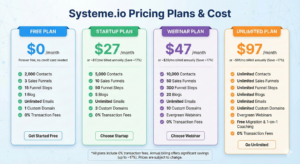
💰 Systeme.io Pricing Breakdown (2026)
Systeme.io offers 4 pricing plans:
1. Free Plan
- 2,000 contacts
- Unlimited emails
- 1 funnel
- 1 website
- Perfect for absolute beginners
2. Startup Plan
- More funnels
- Custom domains
- Automations
- $27/month
3. Webinar Plan
- Evergreen webinars
- More workflows
- $47/month
4. Unlimited Plan
- Unlimited funnels
- Unlimited emails
- Unlimited workflows
- $97/month
Compared to ClickFunnels ($147/month) and GoHighLevel ($97–$297/month), Systeme.io is insanely affordable.
❓ Frequently Asked Questions
1. Is Systeme.io good for beginners?
Yes. It’s one of the easiest marketing tools available.
2. Can I build funnels for clients?
Absolutely — agencies use Systeme.io every day.
3. Does Systeme.io replace ClickFunnels?
For 90% of users, yes.
4. Is the free plan enough?
Yes — you can build a full funnel and send automated emails for free.
5. Can I integrate Stripe or PayPal?
Yes, both are supported.
🏁 Conclusion: Systeme.io Is the Fastest Way for Beginners to Build Funnels, Websites & Email Automation
If you’re a freelancer, small business owner, coach, or digital marketer looking for a simple way to build your online presence, Systeme.io is the best beginner-friendly marketing platform you can choose.
It’s affordable, fast, and eliminates the need for multiple tools.
👉 Funnel Builder
👉 Website Builder
👉 Email Marketing
👉 Automations
👉 Course Platform
All in one.
🔥 Try Systeme.io Free (No Credit Card Needed)
Ready to build your funnel, website, or online business?
🎁 Start your free Systeme.io account here:
👉 https://systeme.io/?sa=sa0106705984b7e20123df6b87229ba5d7396d880c